For $5 the Scanner Radio application available at Blackberry App World is cheap fun! It allows you to listen in to over 2,500 police and fire scanners, railroad communications, and weather radio broadcasts from around the world using your BlackBerry®.
A lot of the radio dialog uses 10 codes, a kind of shorthand you’ve likely heard used on TV shows involving police or fire. A reference to the meanings of these 10 codes can be found at the link here.
Here in Orange County, we’re able to pick up the Orange County Fire radio calls countywide. Unfortunately, police and CHP calls aren’t possible since those are encrypted channels.
The app has a free 7 day trial, so no reason not to give it a try. To get a sense of what will be available to you on your BlackBerry®, head over to Radio Reference and listen in to those channels that interest you. Both the app and the online Radio Reference site are a great way to get a taste of radio scanning without the expense of actually buying a scanner!
Posted in: Android, Off Topic, Date: April 7
Feedback: Comments
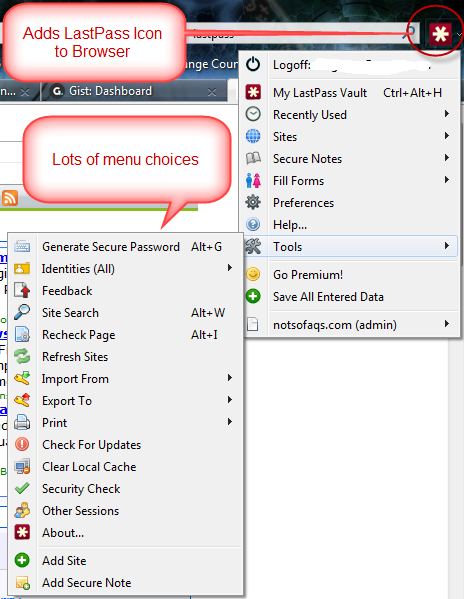
I’ve been using LastPass for months now and have to say that I really like this product. Keeping track of a gazillion passwords across multiple browsers and multiple PC’s was impossible before LastPass. Now it’s a breeze, my laptop, home PC and work PC are all synchronized automatically and the underlying storage of the data is fully encrypted.
You’ll note from the menus displayed to the left that there are lots of options, making this a fairly rich tool.
I highly recommend LastPass.
Posted in: Computer, Date: March 18
Feedback: Comments
If you’ve seen the ‘Could not complete the operation. One or more parameter values are invalid.’ error in Outlook, then you can appreciate it when I refer to it as Outlook Hell!
Apparently, there are a ton of reasons one might get this error. If you google around, you will find all sorts of solutions (which may or may not work for your specific case).
I was seeing this error in Outlook 2003 (no exchange server involved) whenever I did anything with notes. Tried all the recommended solutions with no success until I came across a post here that actually worked for me!
- Tools>options>other tab, then advanced options and unselect “when viewing notes, show time and date”
Thank you so much to Microsoft for giving us one error message that applies to hundreds of possible conditions.
Posted in: Computer, Off Topic, Date: October 19
Feedback: 1 Comment